Help & Setup: Kiosk, Shifts & Timesheet Exports
Guides to set up ClockTap, run attendance day to day, and pay your team.
ClockTap is an attendance app that runs in a web browser. Staff clock in on a Shared Device at the location, or with Personal Login on their own phone. You see the hours, approve overtime and leave, and turn approved hours into pay. There is no biometric device and nothing to install.
New here? Start with Getting started.
The app at a glance
Every page is in the sidebar.
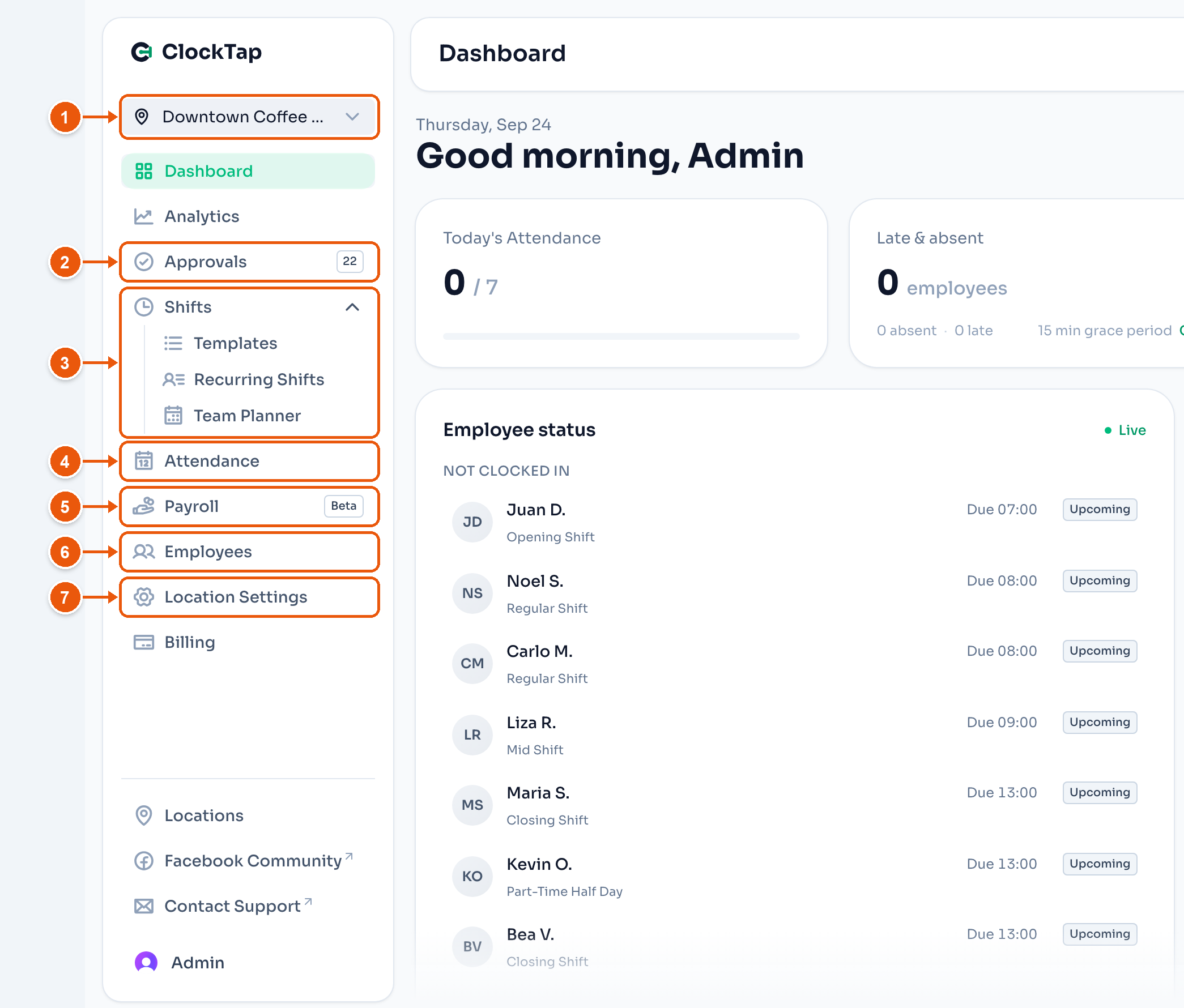
- The location you are working on. Pick another one here. See Dashboard.
- Approvals. Overtime, leave and attendance corrections that wait for you. Here, 22. See Managing approvals.
- Shifts. Templates, Recurring Shifts and the Team Planner. See Shifts.
- Attendance. Every clock-in and clock-out, and the export for a cut-off. See Reports.
- Payroll. In beta. Pay from approved hours, a payslip for each employee, and the pay rules. See Payroll.
- Employees. Add staff, reset a PIN, and give one person their own rules.
- Location Settings. Holidays, lateness, leave, and how staff clock in at this location.
Set up
- Getting started: run the setup wizard and get your team clocking in.
- Shared Device: turn a shared tablet or phone into the time clock.
- Personal Login: let staff clock in on their own phone.
- Share a location: run a location with a business partner.
Day to day
- Dashboard: who is in, late, absent, or off today.
- Managing approvals: approve overtime, leave and corrections.
- Shifts: shift templates and weekly schedules.
- Holidays: each location's holiday calendar.
- Leave policies: leave types, balances and each employee's own rules.
- Overtime: how staff file overtime and when it counts.
Pay the team
- Reports: export attendance for a cut-off.
- Payroll: turn approved hours into pay and finish the payslip.
Help
- FAQ: short answers to common questions.
- What's new: recent changes to ClockTap.